
You’re in the middle of an important client call when it happens again, the line goes dead. You check your phone: zero bars. Walking outside your metal workshop, the signal returns immediately. Sound familiar? If you work or live in a metal building, you’ve experienced one of the most frustrating connectivity challenges of modern life.
Metal buildings create notorious cellular dead zones that disrupt business operations, compromise safety communications, and frustrate anyone trying to stay connected. Whether you operate a warehouse, work in a manufacturing facility, run a metal shop, or live in a metal-sided home, poor cell reception doesn’t have to be permanent.
This comprehensive guide reveals exactly how to boost cell phone signal in a metal building using proven solutions that work. You’ll discover why metal structures block signals, which solutions deliver real results, and how to choose the right system for your specific situation.
Why Metal Buildings Block Cell Signal?
Before solving the problem, understanding why metal buildings kill cell phone signals helps you choose the most effective solution and avoid wasting money on approaches that won’t work.
The Faraday Cage Effect Explained
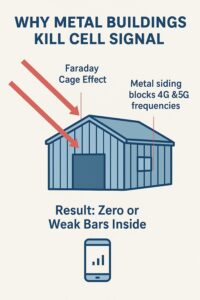
Metal buildings function as unintentional Faraday cages, enclosures that block electromagnetic fields. When cell phone signals (which are radio waves) hit metal surfaces, the metal reflects and absorbs these waves rather than allowing them to pass through. Picture throwing a tennis ball at a chain-link fence versus a solid metal wall. The fence lets some balls through, but the metal wall bounces everything back.
Cell towers transmit signals on specific radio frequencies ranging from 600 MHz to 5 GHz depending on your carrier and network technology (4G LTE or 5G). Metal is exceptionally effective at blocking these exact frequencies. The result? Signals that work perfectly outside your building simply cannot penetrate the metal barrier to reach your phone inside.
Key Factors That Make the Problem Worse
Several conditions amplify signal blocking in metal buildings beyond just the metal itself:
Distance from cell towers dramatically affects available signal strength. The farther you are from the nearest tower, the weaker the outdoor signal becomes. When that already-weak signal encounters metal walls, the small amount that might have penetrated disappears completely. You can use our free tool to check the distance to the nearest tower.
Type and thickness of metal construction determines blocking severity. Steel roofing, corrugated metal siding, and structural steel beams each contribute to signal loss. Buildings with multiple layers of metal, such as insulated metal panels with both interior and exterior metal surfaces, create even stronger barriers. Thicker gauge metal blocks more signal than thinner materials.
Energy-efficient windows and insulation actually worsen the problem. Low-E (low-emissivity) windows contain metallic coatings that reflect heat but also block radio frequencies. Similarly, metal-backed insulation adds another layer of signal-blocking material between the outside world and your phone.
Interior obstacles and layout create additional challenges once you’ve managed to get some signal inside. Metal shelving, machinery, vehicles, and even metal framing in interior walls continue blocking and reflecting signals, creating inconsistent coverage with random dead spots throughout your building.
The science is clear: metal buildings need active solutions to overcome these physical barriers. Simply hoping for better coverage or switching carriers rarely solves the problem because all cellular signals face the same physics-based obstacles.
Effective Solutions: An Overview
Best Solutions Ranked for Metal Buildings
| Solution | Effectiveness | Pros | Cons |
|---|---|---|---|
| Signal Booster | ⭐⭐⭐⭐⭐ | Boosts all carriers; works in metal buildings; strongest improvement; reliable even in dead zones (costly but worth it) | Requires installation; equipment can be expensive depending on building size |
| Wi-Fi Calling | ⭐⭐⭐ | Simple to enable; no hardware required; completely free | Depends on strong internet; does not improve actual cell signal |
| Femtocell / Network Extender | ⭐⭐ | Creates a mini indoor cell tower; moderate cost | Carrier-restricted; depends on internet; limited coverage |
| Building Modifications | ⭐ | Can improve airflow and signal slightly (but expensive and labor-intensive) | Very costly; minimal improvement; not a reliable solution for signal issues |
A comparison chart showing which solutions truly fix weak cell signal in metal buildings.
When it comes to restoring cell phone signal in metal buildings, not all solutions deliver equal results. Here’s a straightforward breakdown of your primary options, ranked by effectiveness for metal structures specifically:
1. Cell Phone Signal Boosters (Most Effective Overall) Signal boosters work by capturing the existing outside signal with an external antenna, amplifying it up to 100 times, and rebroadcasting it inside your building through one or more internal antennas. This is the gold standard solution for metal buildings because the external antenna bypasses the metal barrier entirely.
2. Wi-Fi Calling and Texting (Good Complementary Solution) If you have reliable internet service, Wi-Fi calling routes your calls and texts through your internet connection rather than the cellular network. This works well for voice communication but doesn’t solve cellular data issues or help visitors without your Wi-Fi password.
3. Femtocells/Microcells (Carrier-Specific Option) These devices create a mini cell tower inside your building using your internet connection. However, they typically work with only one carrier, support limited simultaneous users (usually 4-8 devices), and require carrier approval and strong internet service.
4. Strategic Building Modifications (For New Construction or Major Renovations) Installing non-metallic windows, doors, or wall sections in strategic locations can allow some signal penetration. While helpful during the design phase, retrofitting existing buildings is usually impractical and expensive compared to other solutions.
For most metal building situations, cell phone signal boosters provide the most reliable, cost-effective, and comprehensive solution. They work with all carriers simultaneously, support unlimited users, require no internet connection, and boost both voice and data signals.
The Ultimate Solution: Cell Phone Signal Boosters
Let’s dive deep into why signal boosters represent the best answer for how to boost cell phone signal in a metal building and how they actually work.
How Signal Boosters Work
Think of a signal booster as a relay system. The process follows three simple steps:
Step 1: Capture
An outdoor antenna mounted outside your metal building (usually on the roof or a pole) captures the existing cell signal from nearby towers. Because this antenna sits outside the metal structure, it has access to whatever signal is available in your area without any interference from the building.
Step 2: Amplify
The captured signal travels through coaxial cable to an amplifier unit, which boosts the signal strength by 50 to 100 times (measured in decibels or dB). This amplification transforms weak signals that your phone couldn’t use into strong signals that provide reliable connectivity. You can use our dBm converter tool for free.
Step 3: Broadcast
One or more indoor antennas connected to the amplifier rebroadcast the strengthened signal throughout your building’s interior. Your phone connects to this boosted signal just as it would connect to a cell tower, completely unaware that a booster system is involved.
The beauty of this system is its simplicity. No monthly fees, no carrier restrictions, no internet dependency, just an amplified cellular signal that works with every phone and carrier simultaneously.
Key Components Explained
Understanding each component helps you make informed decisions when selecting and installing your system.
Outdoor Antenna: Available in two main types, omnidirectional antennas that capture signals from all directions (ideal when you’re near multiple towers or don’t know tower locations), and directional antennas that focus on signals from one direction (providing stronger capture when aimed at a specific tower). For metal buildings, the outdoor antenna must mount in a location with clear line-of-sight to cell towers, typically above the roofline.
Amplifier: The brain of the system, rated by gain (signal boost power) and coverage area. Commercial-grade amplifiers for metal buildings typically provide 65-70 dB of gain and can support anywhere from 5,000 to 100,000+ square feet depending on the model. Look for amplifiers rated for industrial environments if your building lacks climate control, as these units withstand extreme temperatures.
Indoor Antenna: Multiple styles serve different needs. Panel antennas mount on walls and provide directional coverage, ideal for long narrow spaces or directing signal down aisles. Dome antennas mount on ceilings and provide 360-degree coverage for open floor plans. Large metal buildings often require multiple indoor antennas positioned strategically to eliminate all dead zones.
Cabling: Quality coaxial cable connects all components. Cable type and length matter significantly, longer runs require thicker cable (like LMR-400 or LMR-600) to minimize signal loss. Every connection point must be properly sealed against moisture, especially in metal buildings where condensation can occur.
Do They Really Work for Metal Buildings?
Yes, emphatically. Signal boosters are specifically designed to solve the exact problem metal buildings create. Here’s why they’re so effective:
The outdoor antenna placement completely bypasses the Faraday cage effect that blocks signals. Since the antenna sits outside the metal structure, it has unobstructed access to cellular signals. The metal building that blocks direct signals from reaching your phone becomes irrelevant because you’re essentially relocating the signal source from distant cell towers to inside your building.
Professional installations in metal warehouses routinely transform completely unusable signals (one bar or no service) into strong 4-5 bar connections throughout the entire facility. The key is proper system selection and installation, which we’ll cover in detail next.
How to Choose the Right Booster for Your Metal Building
Selecting the appropriate signal booster system requires evaluating several critical factors specific to your metal building and usage requirements. Making the right choice ensures you get adequate coverage without overspaying for unnecessary capacity.
Decision Factor A: Building Size and Layout
Your building’s square footage directly determines the booster power you need. However, metal buildings require 20-30% more power than the coverage rating suggests due to signal loss from metal surfaces and internal obstacles.
Small to Medium Spaces (1,000-5,000 sq ft): Home workshops, small metal garages, barndominiums, and small retail locations. Look for residential or small commercial boosters rated for 5,000-7,500 square feet to compensate for metal interference. These systems typically use a single interior antenna and provide enough amplification for 1-6 simultaneous users.
Large Commercial Spaces (5,000-20,000 sq ft): Standard warehouses, manufacturing facilities, medium-sized shops, and office buildings. Commercial-grade systems rated for 20,000-30,000 square feet handle these applications effectively. Multiple interior antennas distribute coverage evenly, supporting 10-50+ concurrent users depending on the system.
Industrial/Heavy-Duty Applications (20,000+ sq ft): Large warehouses, distribution centers, manufacturing plants, and multi-building facilities. Enterprise-grade boosters or multiple linked systems provide comprehensive coverage. Professional site surveys and custom installation plans are essential for optimal results in these large-scale applications.
Building layout matters as much as square footage. Open floor plans allow better signal distribution from fewer antennas, while buildings with many interior walls, mezzanines, or separate rooms require more strategic antenna placement and potentially more interior antennas to eliminate dead zones.
Decision Factor B: Outdoor Signal Strength
Your available outdoor signal directly impacts which booster system will work effectively. No booster can amplify a signal that doesn’t exist, so measuring your outdoor signal strength is the crucial first step.
To check your signal in decibel-milliwatts (dBm), which provides actual signal strength rather than unreliable signal bars:
iPhone users: Dial *3001#12345#* and look for “Measured RSSI” or similar field showing negative numbers (like -95 dBm).
Android users: Install a free app like “Network Cell Info Lite” or check Settings > About Phone > Status > Signal Strength on some models.
Understanding dBm readings: Signal strength uses negative numbers where closer to zero means stronger signal. -50 dBm represents excellent signal, -80 dBm is good, -100 dBm is weak but usable, and -110 dBm or lower is very poor. If your outdoor reading is -120 dBm or worse, even powerful boosters may struggle because there’s simply too little signal to amplify effectively.
For metal buildings with outdoor signals of -70 dBm to -95 dBm, standard commercial boosters work excellently. Outdoor signals of -95 dBm to -110 dBm require higher-gain systems with directional outdoor antennas aimed at cell towers. If the outdoor signal measures worse than -110 dBm, consider relocating the outdoor antenna to a higher position or mounting it on a pole extending 10-20 feet above the roofline to capture a stronger signal.
Decision Factor C: Number of Users and Devices
Modern signal boosters are rated not just by coverage area but also by the number of simultaneous connections they support. This specification matters for businesses or residences with multiple people making calls or using data simultaneously.
Entry-level systems support 1-6 users adequately for residential applications or small businesses. Mid-range commercial systems handle 10-25 users comfortably, suitable for most small to medium businesses operating in metal buildings. Enterprise systems support 50+ concurrent users, necessary for larger facilities with substantial staff or customer traffic.
Don’t forget to account for connected devices beyond phones, tablets, mobile hotspots, cellular-connected equipment, and IoT devices all draw from the booster’s capacity. Err on the side of higher capacity if you anticipate growth or have many connected devices.
Decision Factor D: Carrier Compatibility
One significant advantage of signal boosters over femtocells is their carrier-agnostic operation. Most modern boosters support all major U.S. carriers (Verizon, AT&T, T-Mobile, and their MVNOs) simultaneously because they amplify multiple frequency bands covering all carriers.
However, verify that your chosen booster specifically supports the frequency bands used by your carriers in your region. 5G-compatible boosters support newer frequency bands (including n71, n41, and others) alongside traditional 4G LTE bands. Even if you don’t currently use 5G, choosing a 5G-ready booster future-proofs your investment.
For very large facilities where installation costs are substantial, consider which carriers your employees and visitors actually use. This information helps you prioritize antenna placement to ensure excellent coverage for the most-used carriers.
Booster Recommendations by Use Case
| Use Case | Recommended Type | Power / Coverage | Estimated Investment |
|---|---|---|---|
| Small Metal Shop / Garage (1,000–2,500 sq ft) | Residential booster with external directional antenna | 50–60 dB gain, single interior antenna | $300–$600 |
| Barndominium / Metal Home (2,500–5,000 sq ft) | Residential to light commercial system | 60–65 dB gain, 1–2 interior antennas | $500–$900 |
| Medium Warehouse / Shop (5,000–10,000 sq ft) | Commercial-grade booster | 65–70 dB gain, 2–3 interior antennas | $1,000–$2,500 |
| Large Warehouse / Factory (10,000–25,000 sq ft) | Commercial / industrial booster | 70+ dB gain, 3–6 interior antennas | $2,500–$6,000 |
| Very Large Facility (25,000+ sq ft) | Enterprise system or multiple linked boosters | 70+ dB gain, 6+ interior antennas | $5,000–$15,000+ |
| Notes: dB = decibels (signal gain). Prices are estimates, actual cost depends on brand, installation complexity, and local vendor rates. | |||
These ranges include equipment only. Professional installation typically adds $500-$3,000 depending on complexity, building height, and accessibility challenges specific to metal structures.
Reputable brands offering quality systems include weBoost (consumer to light commercial), WilsonPro (commercial and enterprise), SureCall (residential to commercial), HiBoost (commercial applications), and Bolton Technical (commercial and industrial). Always purchase FCC-certified systems to ensure legal compliance and avoid potential network interference.
Professional Installation Tips and Best Practices
Even the highest-quality signal booster won’t perform optimally without proper installation. Metal buildings present unique installation challenges that require careful attention to antenna placement, cable routing, and system configuration.
Antenna Placement is Everything
Success or failure often comes down to antenna positioning. Follow these critical guidelines:
Outdoor Antenna Placement:
- Mount at the highest practical point on your building, typically the roof peak or ridgeline
- Ensure clear line-of-sight to cell towers when possible (use cellmapper.net or OpenSignal app to locate nearby towers)
- Aim directional antennas precisely at the nearest or strongest tower
- Position away from any metal obstructions that might block signal capture
- Mount securely to withstand wind loads (metal buildings in rural areas often face high winds)
- Consider a pole mount extending 10-20 feet above the roofline if the building sits in a signal-weak area or is surrounded by taller structures
Indoor Antenna Placement:
- Position centrally to provide even coverage throughout the space
- Mount dome antennas on ceilings in the middle of open areas
- Mount panel antennas on walls aiming down aisles or toward areas requiring strongest coverage
- Keep interior antennas away from large metal objects (machinery, shelving, vehicles) that block signal distribution
- For multi-antenna systems, space antennas strategically to eliminate dead zones rather than clustering them together
- In buildings with mezzanines or offices, dedicate specific antennas to each level or enclosed space
Critical Separation Requirements
Maintaining adequate distance between outdoor and indoor antennas prevents oscillation, a feedback loop where the indoor antenna signal reaches the outdoor antenna, gets re-amplified, and creates interference that degrades or destroys system performance.
For metal buildings, maintain minimum 20-25 feet vertical separation (like outdoor antenna on roof, indoor antenna at ceiling height inside) or 40-50 feet horizontal separation. The metal structure itself provides excellent isolation, making metal buildings somewhat more forgiving than wood-frame structures. However, never cut separation distances too close to minimum specifications, always err on the side of more separation.
Modern amplifiers include automatic gain control that reduces power if oscillation begins, but proper separation prevents the issue entirely rather than relying on the amplifier to constantly compensate.
Cabling and Grounding Best Practices
Quality cables and proper installation techniques preserve your boosted signal and ensure long-term reliability:
Cable Selection: Use low-loss coaxial cable rated for the frequencies your booster operates on. For runs under 50 feet, RG-6 suffices. For 50-100 feet, use RG-11 or LMR-400. For runs exceeding 100 feet, use LMR-400 or LMR-600 to minimize signal loss. Every 100 feet of cable introduces 3-6 dB of signal loss depending on cable quality, losses that directly reduce your booster’s effectiveness.
Cable Routing: Route cables through conduit when possible to protect against physical damage. In metal buildings, avoid running cables alongside power lines to prevent electromagnetic interference. Support cables every 3-4 feet to prevent sagging and stress on connectors. Keep cable runs as short as practical by positioning the amplifier strategically between outdoor and indoor antennas.
Weatherproofing: All exterior connections require weatherproof sealing. Use self-amalgamating tape or heat-shrink tubing with sealant on every exterior connector. Even small amounts of moisture intrusion degrade performance and can damage equipment. Metal buildings often experience significant condensation, making weatherproofing even more critical than in other structures.
Grounding: Properly ground your system according to electrical code requirements. Lightning protection is essential for outdoor antennas on metal buildings. Install an in-line lightning arrestor in the coax cable run between the outdoor antenna and amplifier. Ground the lightning arrestor and the amplifier chassis to your building’s electrical ground system. This protection prevents equipment damage and potential fire hazards.
DIY vs. Professional Installation
Residential-scale systems (under 5,000 sq ft coverage) with straightforward layouts are reasonable DIY projects for technically-inclined individuals comfortable working on roofs. Manufacturers like weBoost design their consumer systems for self-installation with detailed instructions.
However, professional installation makes sense for:
- Commercial or industrial systems requiring multiple antennas
- Buildings over 10,000 square feet
- Facilities with complex layouts, multiple floors, or many interior walls
- Situations where optimal placement requires extensive tower location research
- When roof work exceeds your comfort level or safety capability
- Where cable runs exceed 100 feet and require careful loss calculations
Professional installers bring specialized equipment including signal meters for precise outdoor antenna aiming, cable testing tools, and experience optimizing system configuration. They also ensure code-compliant grounding and weatherproofing. The installation cost typically represents 20-30% of total project cost but delivers significantly better performance and reliability.
Common Issues and Troubleshooting
Even properly installed systems occasionally require adjustments or troubleshooting. Understanding common issues helps you quickly resolve problems and maintain optimal performance.
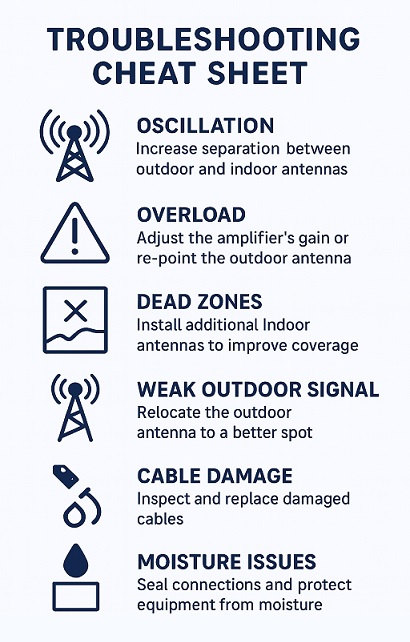
Overload Situations
Overload occurs when the outdoor signal is too strong, causing the amplifier to automatically reduce gain to prevent oscillation or network interference. Symptoms include fluctuating signal strength, the booster’s power light changing colors (many models use color-coded status indicators), or intermittent connectivity.
Quick Fixes:
- Re-aim the outdoor antenna slightly away from the cell tower to capture slightly weaker signal
- Adjust the amplifier’s gain setting to a lower level (many commercial units offer manual gain control)
- Install an inline attenuator in the outdoor antenna cable to intentionally reduce signal before amplification
- Reposition the outdoor antenna to a slightly lower mounting point if signal is extremely strong
Overload rarely occurs in metal buildings located far from towers, but facilities very close to cell towers (within 1/4 mile) sometimes experience this issue.
Oscillation and Feedback
Oscillation happens when insufficient separation allows the indoor antenna signal to reach the outdoor antenna. Signs include the amplifier shutting down, alarm lights indicating oscillation, or creating interference on your phone.
Quick Fixes:
- Increase physical separation between outdoor and indoor antennas
- Reposition indoor antennas to aim away from where the outdoor antenna is located
- Add additional metal barriers between antennas (metal buildings provide excellent natural isolation)
- Reduce the amplifier gain manually if your unit supports this adjustment
Prevention beats correction; always maintain proper separation during initial installation.
Inconsistent Coverage or Dead Spots
Some areas receive strong boosted signal while other spots in the same building show little improvement. This issue typically relates to interior antenna placement or insufficient number of interior antennas for the building size and layout.
Quick Fixes:
- Map the coverage areas and dead spots by walking through the building with your phone while monitoring signal strength
- Reposition interior antennas toward dead spots
- Add additional interior antennas to cover areas beyond the range of existing antennas
- Remove or relocate large metal obstructions blocking signal distribution if practical
- Verify all cable connections are tight and haven’t been damaged or disconnected
Metal buildings with complex layouts often benefit from multiple interior antennas positioned strategically rather than relying on a single central antenna to cover the entire space.
Gradual Performance Degradation
If your system worked well initially but performance has declined over time, several factors might be responsible:
Troubleshooting Checklist:
- Inspect all exterior connections for corrosion or moisture intrusion
- Check that outdoor antenna mounting remains secure and hasn’t shifted position
- Verify cables haven’t been damaged (rodents, foot traffic, caught in doors, etc.)
- Test all connections for tightness
- Ensure nothing has been stacked near interior antennas blocking signal distribution
- Verify the amplifier has adequate ventilation and isn’t overheating (especially important in unconditioned metal buildings)
- Check whether your carrier has decommissioned or repositioned nearby cell towers (use CellMapper to verify current tower locations)
Most performance issues resolve with inspection and minor adjustments rather than equipment replacement. Quality systems should provide 5-10 years of reliable service with minimal maintenance.
Conclusion and Final Recommendations
Metal buildings create challenging environments for cellular connectivity, but modern signal boosters offer proven, reliable solutions to restore strong cell phone signal throughout your facility. Understanding how to boost cell phone signal in a metal building comes down to bypassing the metal barrier with an external antenna, amplifying the captured signal substantially, and distributing that boosted signal evenly throughout the interior.
The most successful approach follows this roadmap:
Step 1: Measure your outdoor signal strength using dBm readings rather than relying on signal bars. This baseline determines whether a signal booster will work effectively for your location and helps you select the appropriate system power level.
Step 2: Accurately assess your building size, layout complexity, number of users, and which carriers require support. These factors directly inform which booster system meets your needs without overpaying for excessive capacity or under-buying inadequate coverage.
Step 3: Choose a quality, FCC-certified signal booster from reputable manufacturers. Invest in commercial-grade equipment for business applications rather than attempting to save money with residential systems that lack the power and durability metal building environments demand.
Step 4: Prioritize proper installation with emphasis on optimal antenna placement, adequate separation between components, quality low-loss cables, and weatherproof connections. Professional installation delivers substantially better results for commercial applications and pays dividends in long-term performance.
Step 5: Test coverage thoroughly throughout your building and make adjustments as needed to eliminate dead zones and optimize performance. Walk the entire facility with your phone, testing calls, data speeds, and signal strength in all areas.
A properly selected and installed cell phone signal booster transforms your metal building from a frustrating dead zone into a fully-connected workspace where calls don’t drop, data loads quickly, and employees can stay productive regardless of their location within the facility. The investment typically pays for itself within months through improved productivity, enhanced safety communication capabilities, and eliminated frustration from constant connectivity problems.
Don’t let metal construction continue limiting your connectivity. Test your outdoor signal strength today, evaluate your building’s specific requirements, and select a signal booster system that delivers the reliable cellular service your metal building operations demand. Your productivity, safety, and peace of mind are worth the investment in a proper solution that actually works.
Frequently Asked Questions (FAQs)
Q1: Why does my cell phone have no signal inside my metal building?
Q2: What is the most effective way to get cell signal in a metal building?
Q3: Do cell phone signal boosters actually work in metal buildings?
Q4: Can I use a Wi-Fi extender to get cell service in a metal building?
Q5: How can I boost my cell signal if I have a metal roof?
Q6: Does aluminum foil help improve antenna reception in a metal building?
Q7: Is there a cell phone booster that works without an outdoor antenna?
Q8: What type of radio works best inside a metal building?
Q9: How much does it cost to install a signal booster in a metal building?
Q10: Can I install a signal booster myself?
Q11: Will a booster work if I’m very far from a cell tower?
Q12: Do boosters work with 5G?
Q13: How many phones can use a booster at once?
Q14: What should I do if my booster isn’t covering certain areas inside?
Q15: Are signal boosters legal?
Q16: How do I check my actual signal strength (not just bars)?
- iPhone: Dial *3001#12345#* and view “Measured RSSI” (a negative dBm value).
- Android: Use apps like “Network Cell Info Lite” or check Settings > About Phone > Signal Strength.