
dBm vs Signal Bars: Which One Really Shows Your Signal Strength?
When your phone shows four or five bars, you probably assume you have a strong cellular signal. But what if another phone in the same location shows only three bars? Or what if your phone has full bars but your mobile internet is painfully slow?
This is where the difference between dBm and signal bars becomes important.
Signal bars are designed to give you a quick, easy-to-understand indication of your cellular connection. dBm, on the other hand, gives you a numerical measurement of received signal power.
So which one should you trust?
The short answer is that dBm gives you a more precise measurement, while signal bars are a convenient but simplified indicator.
In this guide, we’ll explain the difference between dBm and signal bars, why your phone’s bars aren’t always an accurate representation of signal strength, and how you can use dBm to get a better idea of what’s really happening with your cellular connection.
What Is dBm?
Before comparing dBm with signal bars, it helps to understand what dBm actually measures.
dBm stands for decibels relative to one milliwatt. It is a unit used to express power relative to 1 milliwatt and is commonly used in cellular networks to describe the power level of a signal received by a phone.
Cellular dBm readings are normally negative numbers.
For example, your phone might report:
- -65 dBm
- -75 dBm
- -85 dBm
- -95 dBm
- -105 dBm
The important thing to remember is that a number closer to zero generally represents a stronger received signal.
For example:
-70 dBm is stronger than -90 dBm.
If you want a more detailed explanation, see our guide:
What Is dBm? Understanding Cell Phone Signal Strength
What Are Signal Bars?
Signal bars are the little bars you see at the top of your phone screen next to the cellular network indicator.
Depending on your phone, you might see something like:
▂ ▃ ▅ ▇
or a similar icon showing one to five bars.
More bars generally indicate better reception, while fewer bars indicate weaker reception.
The advantage of signal bars is obvious: you don’t need to understand radio measurements or technical terminology. You can glance at your phone and immediately get a rough idea of your connection.
The problem is that signal bars are only an estimate.
Your phone converts underlying network measurements into a simple visual indicator. The way this is done can vary between devices, manufacturers, network technologies, and network conditions.
That’s why two phones in the same location don’t necessarily show the same number of bars.
dBm vs Signal Bars: What’s the Difference?
The simplest way to understand the difference is:
| Feature | dBm | Signal Bars |
|---|---|---|
| Measurement | Numerical measurement | Visual estimate |
| Precision | More precise | Less precise |
| Easy to understand | Requires some knowledge | Very easy |
| Useful for troubleshooting | Yes | Limited |
| Can be compared numerically | Yes | Not reliably |
| Shown on every phone | No | Usually |
In other words, signal bars are convenient, while dBm is more informative.
Why Don’t Signal Bars Tell the Whole Story?
Imagine you’re standing in your house and your phone shows four bars.
Everything looks fine.
But you try to make a call and the audio keeps breaking up. You open a webpage and it takes several seconds to load. You try streaming a video and it keeps buffering.
How can that happen if you have four bars?
Because signal bars don’t necessarily tell you everything about the quality of your cellular connection.
A phone’s overall performance can be affected by several factors, including:
- Received signal strength
- Signal quality
- Interference
- Network congestion
- Distance from the serving cell
- Frequency band
- Network technology
- Your phone’s capabilities
So having several bars doesn’t automatically guarantee fast mobile data or perfect call quality.
Can You Have Full Bars and Still Have Slow Internet?
Yes.
This is one of the most confusing things about cellular networks.
You could have a relatively strong signal and still experience slow data speeds.
One possible reason is network congestion.
Imagine a cell tower serving a busy area during lunchtime. Hundreds or thousands of devices may be communicating with the same network resources.
Your phone may still have a strong signal from the tower, but the available network capacity may be limited.
In that situation, your signal strength might look good while your actual data performance is poor.
This is why you shouldn’t automatically blame weak signal whenever your mobile internet is slow.
Can You Have Fewer Bars but Still Have a Good Connection?
Yes, this can happen too.
Suppose your phone shows two or three bars, but your calls are clear and your mobile data works perfectly well.
There’s no need to panic simply because the number of bars isn’t full.
The phone’s bar display is not a universal measurement where:
5 bars = perfect
and
1 bar = unusable
It’s better to think of the bars as a quick visual indication rather than a precise technical measurement.
Why Do Two Phones Show Different Signal Bars?
This is another reason why comparing bars between phones can be misleading.
Imagine you and a friend are standing next to each other. You’re both connected to the same cellular network, but your phone shows four bars while your friend’s phone shows three.
That doesn’t necessarily mean your phone is receiving exactly 33% more signal.
The phones may use different methods to translate network measurements into the bars displayed on the screen.
Other differences can also matter, including:
- Phone model
- Modem hardware
- Supported frequency bands
- Network technology
- Carrier configuration
- Software
So comparing signal bars between different phones isn’t a particularly reliable way to measure the difference in actual signal strength.
How Does dBm Give You a Better Picture?
Instead of simply saying:
“I have three bars.”
You can look at a numerical measurement such as:
-92 dBm
Now you have a number that can be compared with another measurement.
For example:
- -70 dBm → stronger
- -85 dBm → weaker
- -100 dBm → weaker still
- -110 dBm → very weak in many situations
This makes dBm particularly useful when you’re trying to troubleshoot a cellular reception problem.
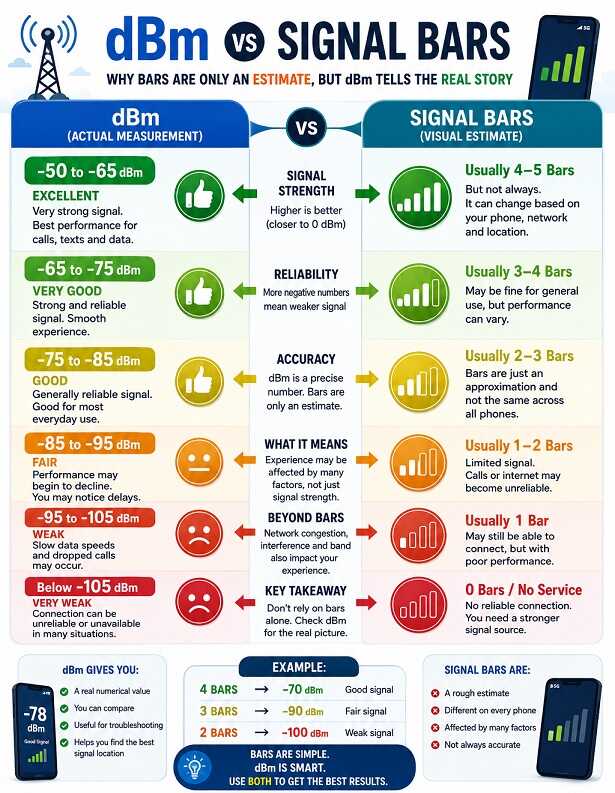
What dBm Is Considered Good?
There isn’t one universal number that defines a “good” cellular signal. The practical result can depend on the network, device, environment, and other conditions.
However, this general guide can help you understand what your reading means:
| dBm | General Signal Level | Typical Experience |
|---|---|---|
| -50 to -65 dBm | Excellent | Very strong reception |
| -65 to -75 dBm | Very good | Strong and generally reliable |
| -75 to -85 dBm | Good | Usually reliable |
| -85 to -95 dBm | Fair | Performance may begin to decline |
| -95 to -105 dBm | Weak | Slow data or dropped calls may occur |
| -105 to -115 dBm | Very weak | Connection can become unreliable |
| Below -115 dBm | Extremely weak | Connection may be difficult |
Remember that these are general guidelines. They shouldn’t be treated as strict boundaries for every phone and network.
How to Check Your Actual dBm Signal
If you want to know what’s really happening with your cellular reception, checking dBm can be more useful than simply counting bars.
Depending on your phone, you may be able to find signal information through a built-in diagnostic or testing menu. The exact information available varies between devices and operating systems.
You can also use a dedicated Mobile Signal Strength dBm Converter & Network Speed Estimator tool.
Try the Mobile Signal Strength dBm Converter & Network Speed Estimator to measure your dBm
Once you have your dBm reading, you can compare it with the ranges above to get a better idea of your signal strength.
What If My dBm Is Good but My Internet Is Slow?
This is an important question because signal strength and network performance aren’t exactly the same thing.
If you’re seeing a reasonably strong dBm reading but your mobile internet is slow, consider other possible causes.
Network Congestion
A busy cell tower can affect data speeds even when your phone has a good signal.
Signal Quality
Interference can reduce the quality of a cellular connection even when the received signal power looks reasonable.
Network Band
Your phone may be connected to a particular frequency band that offers different coverage and capacity characteristics.
Device Limitations
Older phones may not support the same network technologies or frequency bands as newer devices.
This is why cellular diagnostics can involve measurements such as RSRP, RSRQ, and SINR in addition to dBm.
Does Moving Around Change Your dBm?
Absolutely.
Cellular signal can change significantly even within the same building.
For example, you might get:
-78 dBm near a window
and:
-98 dBm in the middle of the building.
Walls, concrete, metal, glass, insulation, furniture, and the building’s overall construction can all affect how cellular signals reach your phone.
This is particularly noticeable in:
- Basements
- Metal buildings
- Large warehouses
- Concrete buildings
- Underground areas
- Buildings with energy-efficient windows
If you’re dealing with poor indoor reception, checking the signal in several locations can help you identify where the strongest usable signal is available.
Can a Signal Booster Increase Your dBm?
A properly installed cellular signal booster can improve the cellular signal available inside a building when there is an existing usable signal to capture.
A typical booster system uses an outside antenna to receive a cellular signal, sends that signal to the booster, amplifies it, and then distributes the improved signal indoors.
However, a booster isn’t a magic solution for an area where there is absolutely no usable cellular signal.
That’s why it’s useful to check your outdoor signal before choosing a booster.
If the signal is considerably stronger outside than it is inside, a booster may be worth investigating.
You can also read our guide on how to boost cell phone signal in a metal building if building materials are causing your reception problems.
Should You Trust dBm More Than Signal Bars?
For general everyday use, signal bars are perfectly convenient.
If you’re simply checking whether you have enough reception to make a call, you probably don’t need to worry about dBm.
But when you’re trying to diagnose a weak cellular signal, dBm is much more useful.
Instead of saying:
“My phone has two bars.”
You can say:
“My phone is receiving around -103 dBm.”
That gives you a much clearer starting point for troubleshooting.
What Is the Best Way to Test Cell Signal?
If you’re investigating a reception problem, don’t take a single measurement and assume it tells the whole story.
Try measuring your signal:
- Inside the building
- Outside the building
- Near windows
- On different floors
- In the room where you normally experience problems
- At different times of day
Write down the approximate dBm readings and look for a pattern.
For example, if you consistently get:
-75 dBm outside
but:
-105 dBm inside
then the building itself may be contributing significantly to your reception problem.
On the other hand, if you get around -105 dBm both inside and outside, the problem may be related to the coverage available in that area rather than simply the building blocking the signal.
Final Thoughts: dBm vs Signal Bars
So, dBm vs signal bars—which is better?
The answer depends on what you’re trying to do.
Signal bars are easier. They’re designed for everyone and give you a quick visual indication of your cellular connection.
dBm is more precise. It gives you a numerical measurement that can be compared across different locations and situations.
If your phone has full bars and everything works normally, there’s probably no reason to worry about the exact dBm value.
But if you’re experiencing dropped calls, slow mobile data, or unreliable reception, looking at your actual dBm reading can give you much more useful information than simply looking at the bars.
And remember the most important rule:
With typical cellular dBm measurements, a number closer to zero generally means a stronger signal.
So -70 dBm is stronger than -90 dBm, even though -90 looks like the “larger” number at first glance.
For more information you can also read our Cell Phone Signal Strength dBm Chart: What Is a Good Signal? article as well.
Quick Takeaway
- Signal bars are a simple visual estimate of cellular reception.
- dBm provides a numerical measurement of received signal power.
- Different phones may display different numbers of bars in the same location.
- Full bars don’t necessarily mean fast mobile internet.
- A strong dBm reading doesn’t guarantee good performance because congestion and interference can still matter.
- -70 dBm is stronger than -90 dBm.
- dBm is particularly useful when troubleshooting weak cellular reception.
- Testing your signal in several locations can help identify where the problem is coming from.